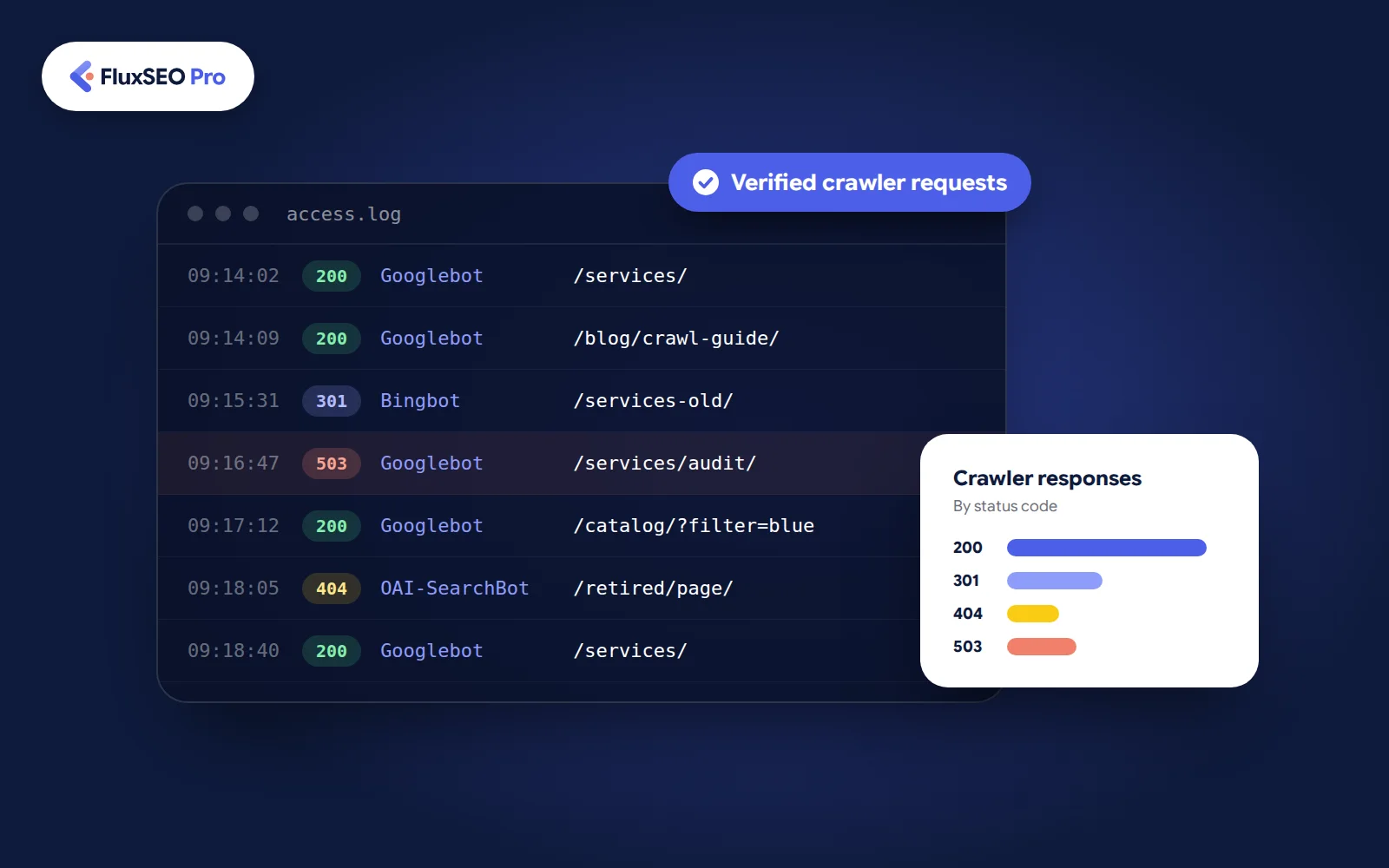
The value comes from connecting requests to decisions. A report showing thousands of crawler visits is useful only when it helps you identify an issue, prioritize a fix or confirm that a change worked.
Quick answer
- 1
Check that the logs cover the relevant hosts, dates and requests.
- 2
Verify crawler identities instead of trusting user-agent names.
- 3
Group requests by page type, response status and date.
- 4
Compare the findings with Search Console, sitemaps and a website crawl.
- 5
Assign fixes and recheck the affected URLs after implementation.
01What a server access log contains#
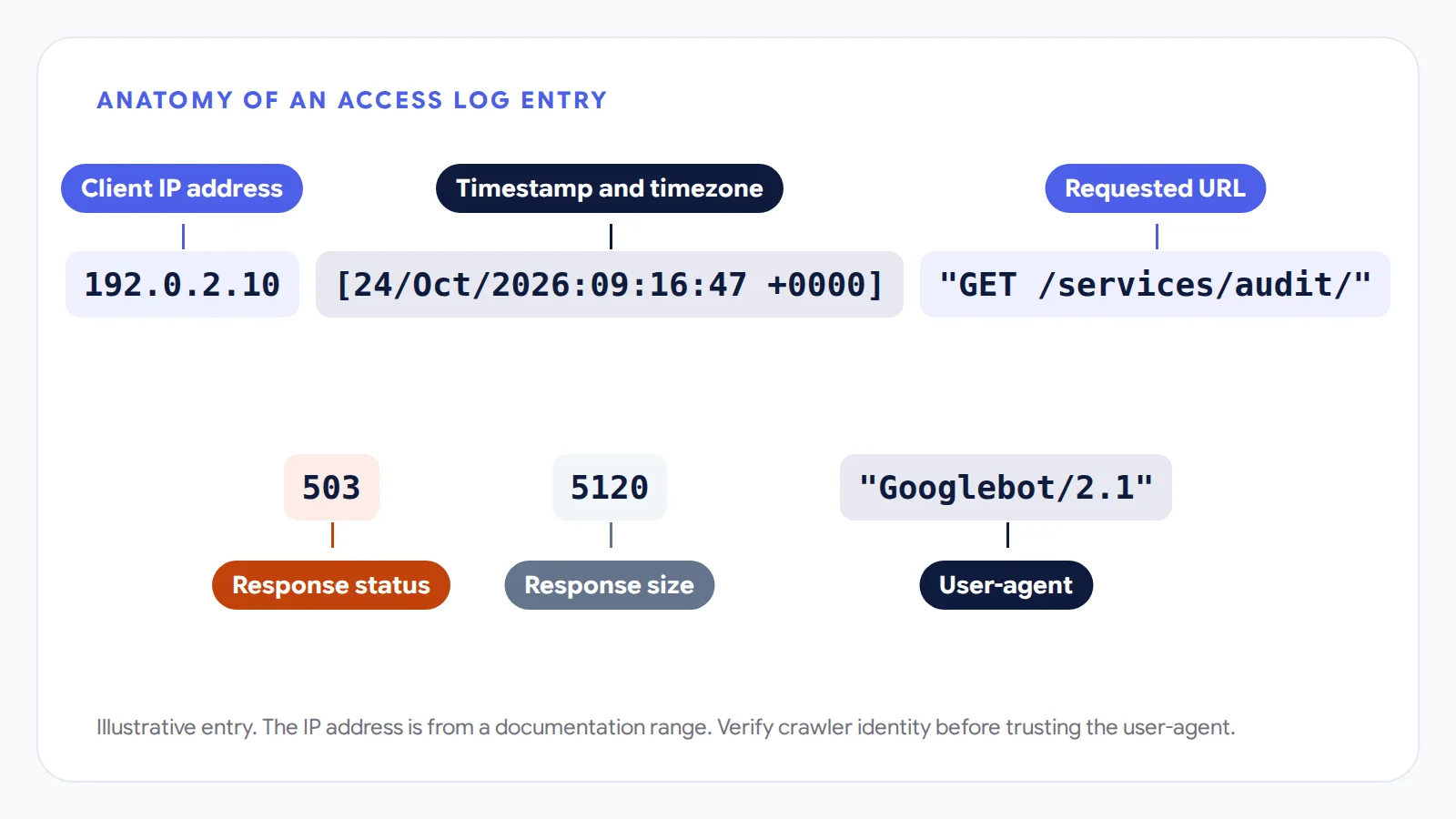
An access log records requests received by the system producing it. Each entry typically includes a timestamp, requested URL and response status, with other fields depending on the logging configuration.
SEO log analysis primarily uses access logs. Error logs can support an investigation, but they do not provide the same request history. Screaming Frog's Introduction To Log Files explains the difference and lists common access-log fields.
| Field | What it helps you investigate |
|---|---|
| Timestamp and timezone | When requests occurred and how they relate to an incident |
| Requested host and URL | Which pages or resources were requested |
| Response status | Whether the system returned a successful response, redirect or error |
| User-agent | The identity claimed by the requester |
| Client IP address | Evidence used to verify crawler identity |
| Response size | The recorded size of the response |
| Response timing, if available | How long a recorded stage of the request took |
A user-agent containing "Googlebot" is a starting point for filtering. Verification comes later.
You also need to know where the records were collected. CDN, web-server and application logs may cover different parts of a request. Cloudflare's Cloudflare Logs documentation confirms that its product-generated records can be combined with other sources, including application-server logs.
Before interpreting an absent URL, ask whether the dataset would have captured that request in the first place.
02What log file analysis shows about crawling#
Start with a question about an important page group or a suspected technical problem. Sitewide totals can wait.
Whether important pages received requests
Suppose a manufacturer publishes a new category of equipment pages, but they remain absent from search. Logs can help establish whether verified Googlebot requests reached those URLs during the recorded period.
If requests are present, inspect the responses and investigate indexing separately. If they are absent, check data coverage before examining discovery and access.
Google's Troubleshoot Google Search crawling errors explicitly recommends using site logs to check whether Googlebot crawled specific URLs.
Report the finding precisely. "No verified Googlebot request appears in this export" describes the evidence. "Google has never visited this page" goes beyond it.
How crawling is distributed across the website
Group URLs by their purpose. A logistics website might separate service pages from articles and shipment-tracking paths. An online store might compare product pages, collections and filter combinations.
This reveals which sections receive requests and how those patterns change. It also makes unusual activity easier to investigate.
Frequent requests to parameter URLs deserve attention, but first check what those URLs do. Some represent useful pages. Others may repeat existing content or generate unnecessary combinations.
The useful comparison is between the site's URL inventory, its business priorities and the observed request patterns.
Which responses crawlers received
Repeated errors on live commercial pages usually deserve earlier investigation than requests to correctly retired pages.
Compare the affected timestamps with deployments and hosting incidents. Check whether the issue appears across the site or only on one template.
For example, if service pages return server errors while articles continue to respond normally, the service template or its dependencies become a useful starting point. A technical SEO investigation should turn that evidence into a specific implementation task.
What changed after a migration
Logs help you compare requests to old and new paths following URL changes.
An education provider restructuring its course pages could inspect whether retired URLs return the intended redirects and whether replacement URLs receive requests. Continued crawling of old paths alone is not evidence of a failed migration.
Test the full redirect path separately. A recorded redirect status does not necessarily reveal every subsequent hop or the final destination.
03What logs cannot tell you#
Crawling and indexing are separate stages. Google explains in its Optimize your crawl budget guidance that fetched pages still need evaluation before they may enter the index.
Keep those boundaries clear when reporting findings.
| Observation | Supported conclusion | Conclusion requiring more evidence |
|---|---|---|
| Verified Googlebot requested a page | A request occurred during the recorded period | The page was indexed |
| The page returned 200 | The recorded response was successful | Its content was useful and indexable |
| Recorded requests increased | More requests appeared in the dataset | Rankings or traffic improved |
| A URL is absent | No matching request was found | Google has never crawled it |
| An AI agent requested a page | That request occurred, if verified | The page was cited in an AI answer |
Standard access records also do not show a complete rendered page. They cannot independently explain canonical selection or why one result outranks another.
Use logs to establish request-level facts, then choose the next source of evidence for the remaining question.
04Server log analysis versus Search Console and a website crawl#
These sources work best together. Each adds information that the others may lack.
| Source | Useful questions |
|---|---|
| Access logs | Which recorded requests reached these URLs, when, and with what responses? |
| Search Console Crawl Stats | What crawling trends and response groups does Google report? |
| Search Console URL Inspection | What information does Google report for this specific URL? |
| A website crawl | What links, directives and responses can the crawler inspect under its settings? |
| Search performance and analytics reports | Did visibility, visits or measured business actions change? |
Google states that the example URLs in its Crawl Stats report are not exhaustive. A URL missing from those examples may still have been requested.
Timing also explains apparent disagreements. A website crawl might show that a page works today, while logs reveal server errors during yesterday's deployment.
A useful SEO audit combines these findings into one account of what happened. It should distinguish the historical incident from any problem that remains active.
05When log file analysis is worth doing#
Choose the depth of analysis around the uncertainty you need to resolve.
| Situation | Recommended starting point |
|---|---|
| Small website with no unexplained crawl issues | Search Console and a routine website crawl |
| Important pages appear to be missed repeatedly | Inspect recorded requests alongside URL Inspection |
| Extensive parameter or filtered URLs | Group crawling by URL pattern and page purpose |
| Recent migration or major URL changes | Compare old and new paths and their responses |
| Intermittent errors or suspected crawler blocking | Examine requests around the incident |
| Rankings fell while crawling appears normal | Investigate other explanations before expanding log work |
Google's crawl-budget guidance primarily addresses large or frequently changing sites, along with sites experiencing substantial discovery-related indexing issues. Its size examples are approximate, not strict thresholds for using logs.
A small accounting website may still need a focused investigation after a server change. Conversely, a large site does not need a new log report every week unless the report informs an actual decision.
For organizations with frequent releases, recurring analysis can support enterprise SEO monitoring. Set the reporting frequency around the rate of change and the consequences of a missed issue.
06A worked example of Googlebot log analysis#
Suppose a B2B supplier wants to investigate crawling after launching new service pages.
The following dataset is hypothetical. Its numbers demonstrate an analysis process and are not client results or industry benchmarks.
For this exercise, assume a complete seven-day export for the relevant host and request types. Crawler identities have already been verified.
Build the request summary
Start with this sequence:
- 1
Filter the records to verified Googlebot requests.
- 2
Separate page requests from other resources for this investigation.
- 3
Group URLs by directory and parameter pattern.
- 4
Split request counts by response status.
- 5
List the most-requested URLs within each group.
- 6
Compare requested URLs with the intended sitemap inventory.
Keep both request counts and unique URL counts. A hundred requests to one page describe a different situation from one request to each of a hundred pages.
| URL group | Requests | Unique URLs requested | 200 | 301 | 404 | 503 |
|---|---|---|---|---|---|---|
| /services/ | 120 | 18 | 108 | 0 | 0 | 12 |
| /blog/ | 300 | 30 | 300 | 0 | 0 | 0 |
| /services-old/ | 80 | 8 | 0 | 80 | 0 | 0 |
| /catalog/?filter=... | 500 | 200 | 500 | 0 | 0 | 0 |
| /retired/ | 20 | 5 | 0 | 0 | 20 | 0 |
Assume the sitemap contains 24 service URLs. Only 18 appear in the verified request records, leaving six to investigate.
Decide what deserves attention
The 12 service-page errors are a clear starting point. Inspect their URLs and timestamps to establish whether they affected one page repeatedly or several pages during the same incident. Send that evidence to the developer responsible for the affected system.
Next, examine the six service URLs absent from the records. Confirm their publication dates, internal links and indexability. Pages published near the end of the period need different interpretation from pages that existed throughout it.
The old service paths are returning redirects. Test their destinations and update any internal links still pointing to those paths.
The parameter group accounts for the largest request count, but that alone does not justify blocking it. Review whether those URLs provide distinct value and how the site creates them.
Finally, check whether the retired URLs are intentionally gone. An expected 404 may require no change.
Write an action list
The report should identify owners and verification steps.
| Priority | Action | How to verify |
|---|---|---|
| First | Investigate service-page 503 responses | Review subsequent requests to the affected URLs |
| Next | Investigate service URLs absent from the period | Check discovery evidence and later request records |
| Next | Validate old service redirects | Test destinations and recrawl internal links |
| Further review | Assess filtered URL inventory | Compare page purpose with generation rules |
This analysis creates a defensible work queue. It does not establish that reducing parameter crawling will automatically increase visits to the six service pages.
07How to prepare the data without losing useful evidence#
Ask your developer or hosting provider about coverage before choosing an analysis tool.
Confirm the relevant hosts, available dates and timezone. Ask whether records are sampled or filtered and whether retention limits created gaps. Establish what the client-IP and timing fields actually represent.
Keep an untouched copy of the export. Preserve query strings until you know whether they matter to the investigation, and avoid merging URLs simply because they look similar.
Verify crawler identities
Google's Verify requests from Google crawlers and fetchers documentation describes matching source IPs against published ranges or performing reverse DNS followed by forward DNS verification. A matching user-agent name is insufficient.
Keep verified, unverified and unrelated requests in separate groups. This prevents an impersonating bot from distorting your Googlebot analysis.
Choose a tool that fits the export
For a small, parsed export, a spreadsheet can be enough to filter rows, build pivot tables and match URLs against a sitemap list. Crawler verification must be completed separately or supplied as a reliable field.
The Screaming Frog SEO Log File Analyser supports log importing and crawler analysis. It is useful when you want a dedicated interface for investigating requests.
For larger datasets, use a database or query system your technical team can maintain. Choose based on data size, format and repeatability, rather than buying software before defining the task.
Restrict access to exports and remove unnecessary sensitive information before sharing. Coordinate that preparation with crawler verification so required evidence is not discarded too early.
08How to analyze Bingbot and AI crawler requests#
Separate crawlers by their documented purpose. Combining every bot into one total makes the report harder to interpret.
Bing provides a Verify Bingbot tool and published verification guidance. As with Googlebot, a familiar name in the user-agent does not establish authenticity.
OpenAI's Overview of OpenAI Crawlers distinguishes automated search crawling, potential training use and user-triggered requests.
| Agent | Documented purpose |
|---|---|
| OAI-SearchBot | Supports website discovery in ChatGPT search |
| GPTBot | Crawls content that may be used to train foundation models |
| ChatGPT-User | Handles certain user-triggered visits rather than automatic web crawling |
OpenAI publishes IP information for these agents and treats search and training controls separately. Check the current documentation when interpreting requests or changing access rules.
For answer engine optimization, the useful technical question is whether intended search access is working. A verified request receiving an unexpected block can justify an investigation.
When reporting generative engine optimization, keep access evidence separate from visibility evidence. A request record does not show whether an answer cited the page or recommended the business. Those outcomes need separate observation.
09What to fix first and how to check the result#
Prioritize findings according to the affected pages, recurrence and business impact.
Repeated errors on active application or service pages generally deserve investigation before expected requests to retired content. An isolated event may need monitoring rather than a sitewide change.
Each assigned fix should include the affected URLs, supporting timestamps and the expected behavior after implementation. Place the work within your broader technical SEO checklist so that request evidence is checked alongside links, directives and page content.
Use comparable observation periods where practical. Record deployments and logging changes that could explain differences.
If the original issue was recurring server errors, the first verification is that those errors stop appearing in subsequent requests. Indexing and traffic can be reviewed afterward as separate outcomes.
The report is ready to hand over when someone can act on it without asking which URLs are affected, what evidence supports the recommendation or how completion will be checked.
FAQFrequently asked questions
Log file analysis examines access records to investigate search crawler requests. Depending on the available fields, it can show requested URLs, timing and responses. Indexing and search performance require additional evidence.
Small websites may need it for a specific incident, such as intermittent server errors or unexpected crawler blocking. Routine checks can start with Search Console and a website crawl. Use logs when those sources leave an important question unresolved.
Sometimes. Search Console can answer general crawling questions, while logs add request-level evidence for specific URLs and periods. Crawl Stats' example URLs are not a complete request history.
Collect enough to cover the behavior or incident being investigated, with a comparison period where useful. A short outage and delayed recrawling require different observation windows. Check retention early so relevant records remain available.
Yes, if the export is small enough and its fields have been parsed correctly. Filters and pivot tables can summarize requests by URL, status and date. Verify crawler identities before treating user-agent matches as genuine bot activity.
No. A verified visit establishes a request, not a citation or recommendation. Different agents also serve different purposes, so identify the requester before interpreting the activity.
The analysis helps identify and verify technical fixes. Any effect on rankings depends on the underlying problem and other factors affecting the website. More crawling alone is not evidence of improved search performance.